

project
"Weeding Vinyl is Hard" t-shirt
A tongue-in-cheek heat transfer vinyl design with some (intentional) errors.
 HeatSync Labs
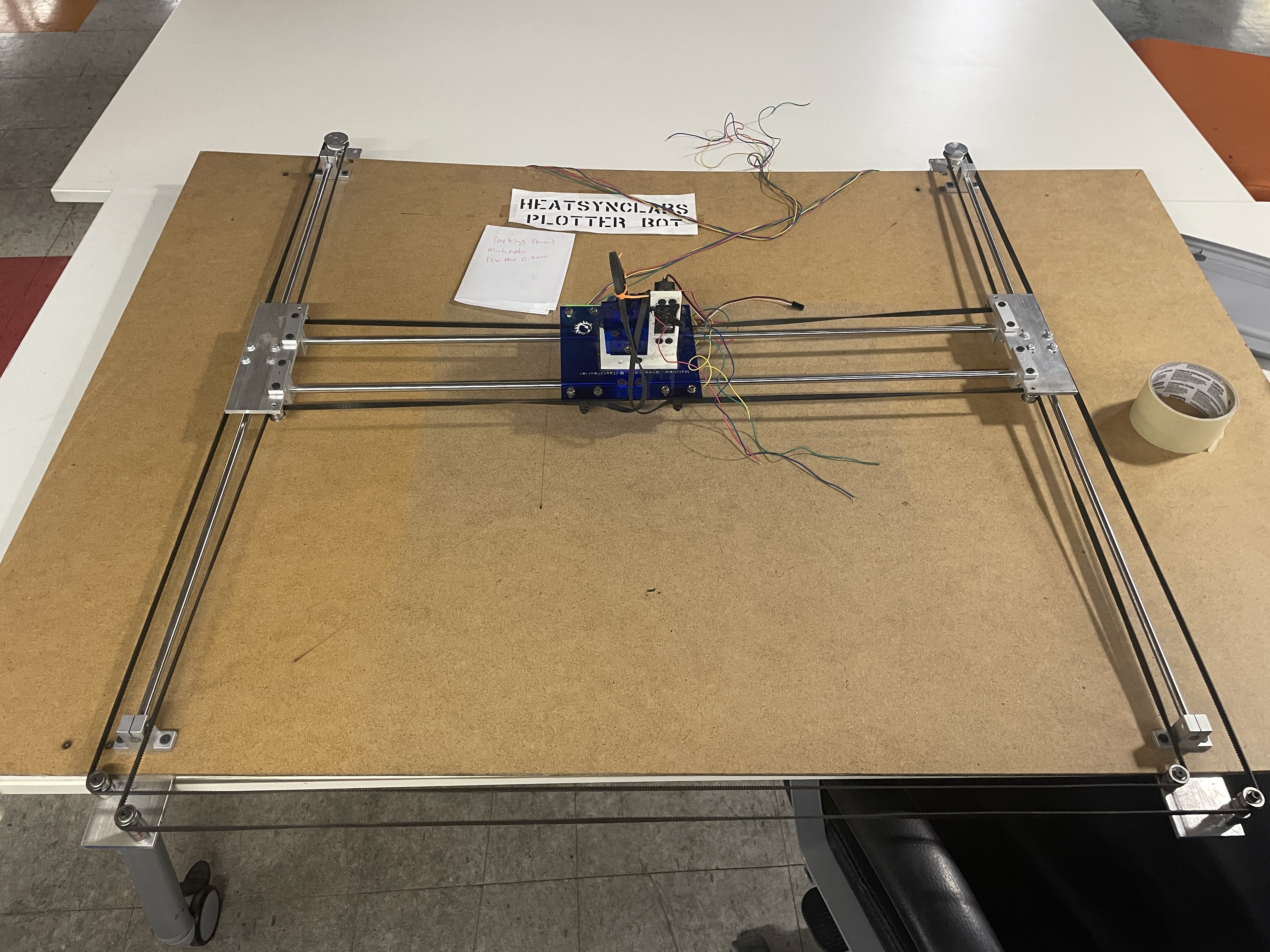
This project is about bringing an X/Y plotter from storage back to life. It has a carriage that uses a servo to lift a pen up and down (or anything else you can think to mount). It was built by Matt Shepard nearly 10 years ago and has been in storage. The aim is turning it into an interactive window display using a web interface.
A web browser capable of web serial
Boredom
| Component | Qty | Notes |
|---|---|---|
| ESP32 w/ Stepper Drivers | 1 | https://www.amazon.com/dp/B0GGH9DQBY?ref=ppx_yo2ov_dt_b_fed_asin_title&th=1 |
| Two Steppers | 1 | - |
| 12v power supply | 1 | - |
| XY gantry | 1 | - |
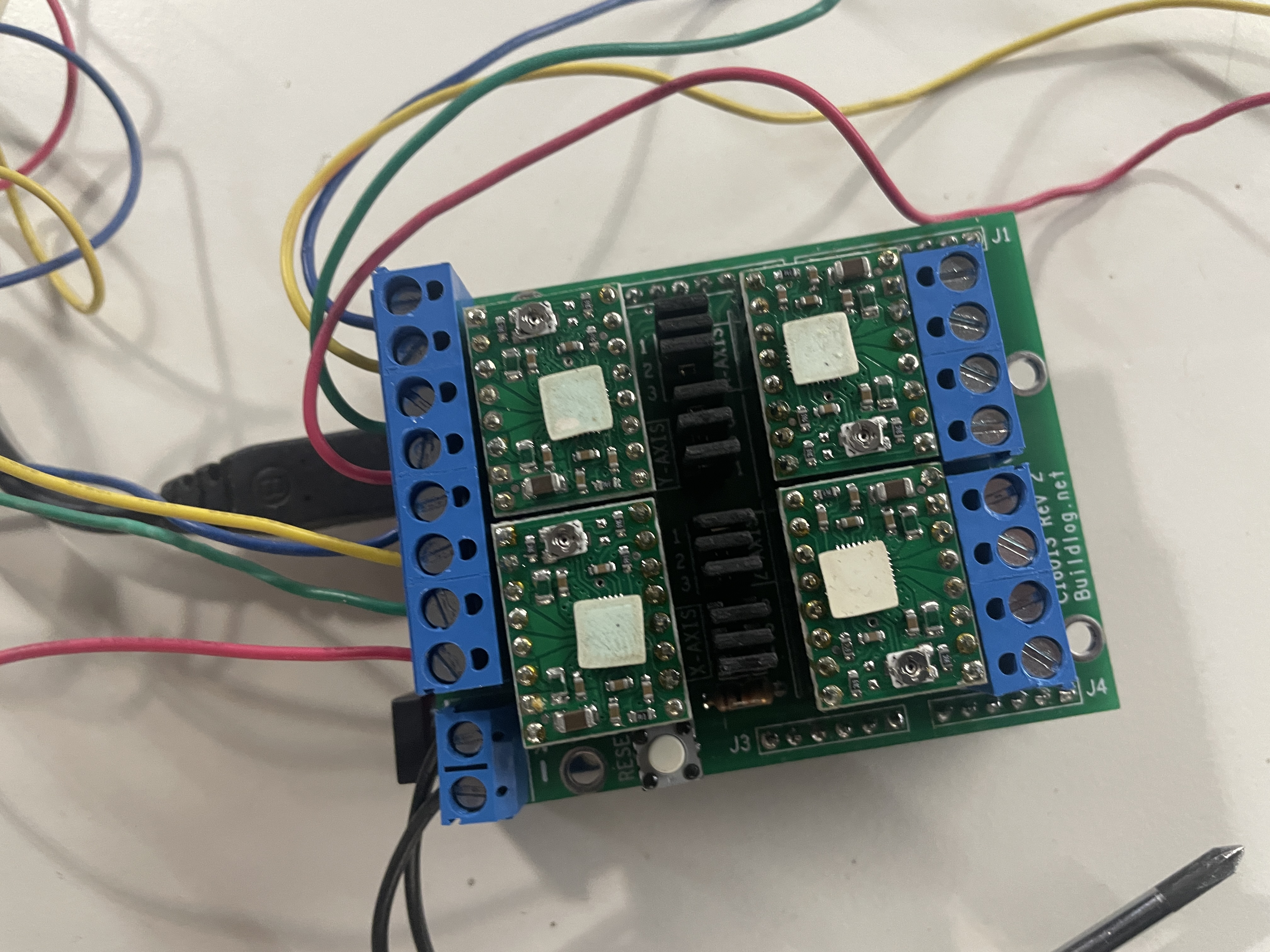
While I intend to replace the controller with an esp32 with built-in stepper drivers, presently it uses a Buildlog.net 4-Axis Stepper Driver Shield (the original Bart Dring CNC shield).
I used Claude to write firmware and web interface for it based on the arrangement of the belts (Thank you Elias for helping get the belts back on correctly!)
I wired up the steppers according to the image on to the shield and then placed it on an Arduino Uno. Then flashed it with the following firmware which gives it a serial interface for essentially taking GCODE.
I wired up the steppers according to the image on to the shield and then placed it on an Arduino Uno.
Then flashed it with the following firmware which gives it a serial interface for essentially taking GCODE.
/*
  HEATSYNC CoreXY Plotter Bot  (Buildlog.net 4-Axis Stepper Shield, p/n C16013)
  -----------------------------------------------------------------------------
  Board:   Arduino Uno R3
  Shield:  Buildlog.net 4-Axis Stepper Driver Shield (C16013), takes Pololu-style
           A4988 / DRV8825 / StepStick driver modules. Step/dir control.
  Drive:   2 bipolar steppers in a CoreXY / H-bot belt layout
  Pen:     hobby servo on a free signal pin (default D12)

  This is the step/dir version. It speaks the SAME serial protocol as the motor
  shield version, so the WebSerial page (plotter_console.html) works unchanged.

  Pin map (from the C16013 user guide, the board's hardwired Arduino routing):
       X Step = D2    X Dir = D3
       Y Step = D4    Y Dir = D5
       Z Step = D6    Z Dir = D7      (unused on a 2-motor plotter)
       A Step = D10   A Dir = D11     (unused)
       Enable = D8    (shared by all drivers, ACTIVE LOW: LOW = energized)
  NOTE: this map is from the Rev 3 guide. Rev 2 is almost certainly identical
  because changing it would break every grbl config, but glance at your board's
  silkscreen or the Rev 2 schematic on buildlog.net to be sure. If a jog moves
  the wrong axis or nothing moves, the pin defines below are where you fix it.

  Driver setup before you power anything:
    - Orientation is critical. A backwards driver dies instantly when powered.
      Match the module to the silkscreen (the pot/EN arrow) on each socket.
    - Set the current limit with the pot (VREF). Start LOW for a light pen
      carriage, around 0.3 to 0.5 V at the pot, then raise only if it skips.
    - Set the microstep jumpers the SAME on X and Y, and match STEPS_PER_MM.
    - Never connect or disconnect a stepper with the board powered. It can kill
      the driver.

  Homing is manual (no endstops):
    1. OFF        (drivers disabled, push the carriage by hand)
    2. push to your origin corner
    3. ZERO       (that spot is now 0,0)
    4. jog / plot. +X right, +Y away from the motors.

  Serial: 115200 baud, newline-terminated. Each command replies "ok".
    G1 X.. Y..  move absolute mm (missing axis keeps current; G0 is an alias)
    PU / PD     pen up / pen down       (alias U / D)
    ZERO        set current to 0,0      (alias G92, or G92 X.. Y..)
    G28         home: pen up, go to 0,0 (alias HOME)
    F<n>        top speed in steps/sec
    OFF / ON    disable / enable drivers (alias M84 / M17)
    ?           status                  (alias M114)

  Libraries: AccelStepper (MultiStepper ships with it), Servo (bundled).
  -----------------------------------------------------------------------------
*/

#include <AccelStepper.h>
#include <MultiStepper.h>
#include <Servo.h>

// ============================ PINS ==========================================
#define X_STEP 2
#define X_DIR  3
#define Y_STEP 4
#define Y_DIR  5
#define EN_PIN 8          // shared driver enable, ACTIVE LOW (LOW = on)
#define PEN_PIN 12        // servo signal. Use a free, accessible, UNFILTERED pin.
                          // D12 (spindle pin) is usually clean. Do NOT use a
                          // limit-input pin, the RC filter there mangles servo PWM.

// ============================ CONFIG ========================================
// STEPS_PER_MM = motor_steps * microsteps / mm_per_rev
//   200-step motor, 1/8 microstep, GT2 belt on a 20T pulley (40 mm/rev):
//   200 * 8 / 40 = 40.  CALIBRATE this once you know your real numbers.
float STEPS_PER_MM = 40.0;

// CoreXY direction commissioning. Flip until +X goes right, +Y goes away.
#define SWAP_AB    0
#define INVERT_A   0
#define INVERT_B   0
#define SWAP_XY    0

// Motion. Real drivers let you go much faster than the L293D shield did.
// AccelStepper on a 16 MHz Uno tops out near 3000 to 4000 steps/sec for two
// coordinated motors. Start here and raise until it skips.
float maxSpeedSPS = 2000.0;

// Soft limits (measured from where you ZERO, since there are no endstops).
#define ENABLE_SOFT_LIMITS 1
float MIN_X = 0.0,  MAX_X = 280.0;
float MIN_Y = 0.0,  MAX_Y = 280.0;

// Pen servo
#define PEN_UP_ANGLE   50
#define PEN_DOWN_ANGLE 90
#define PEN_SETTLE_MS  220

// ============================ HARDWARE ======================================
AccelStepper stepperA(AccelStepper::DRIVER, X_STEP, X_DIR);   // CoreXY motor A -> X socket
AccelStepper stepperB(AccelStepper::DRIVER, Y_STEP, Y_DIR);   // CoreXY motor B -> Y socket
MultiStepper gantry;

Servo pen;
bool penIsDown  = false;
bool motorsLive = false;

char buf[80];
uint8_t bufIdx = 0;

// ============================ KINEMATICS ====================================
// CoreXY:  A = X + Y,  B = X - Y   (steps).   X = (A+B)/2,  Y = (A-B)/2
void xyToMotors(float x, float y, long &a, long &b) {
  if (SWAP_XY) { float t = x; x = y; y = t; }
  long sx = lround(x * STEPS_PER_MM);
  long sy = lround(y * STEPS_PER_MM);
  long ta = sx + sy;
  long tb = sx - sy;
  if (INVERT_A) ta = -ta;
  if (INVERT_B) tb = -tb;
  if (SWAP_AB)  { long t = ta; ta = tb; tb = t; }
  a = ta; b = tb;
}
void motorsToXY(long a, long b, float &x, float &y) {
  if (SWAP_AB)  { long t = a; a = b; b = t; }
  if (INVERT_A) a = -a;
  if (INVERT_B) b = -b;
  long sx = (a + b) / 2;
  long sy = (a - b) / 2;
  float fx = (float)sx / STEPS_PER_MM;
  float fy = (float)sy / STEPS_PER_MM;
  if (SWAP_XY) { float t = fx; fx = fy; fy = t; }
  x = fx; y = fy;
}
void currentXY(float &x, float &y) {
  motorsToXY(stepperA.currentPosition(), stepperB.currentPosition(), x, y);
}

// ============================ ACTIONS =======================================
void energizeMotors() { digitalWrite(EN_PIN, LOW);  motorsLive = true; }
void releaseMotors()  { digitalWrite(EN_PIN, HIGH); motorsLive = false; }

void applySpeed() {
  stepperA.setMaxSpeed(maxSpeedSPS);
  stepperB.setMaxSpeed(maxSpeedSPS);
}

void moveToXY(float x, float y) {
  if (ENABLE_SOFT_LIMITS) {
    x = constrain(x, MIN_X, MAX_X);
    y = constrain(y, MIN_Y, MAX_Y);
  }
  energizeMotors();                            // drivers must be enabled to move
  long targets[2];
  xyToMotors(x, y, targets[0], targets[1]);    // [0]=A, [1]=B (addStepper order)
  gantry.moveTo(targets);
  gantry.runSpeedToPosition();                 // blocks until both reach target
}

void setPen(bool down) {
  pen.write(down ? PEN_DOWN_ANGLE : PEN_UP_ANGLE);
  penIsDown = down;
  delay(PEN_SETTLE_MS);
}

void printStatus() {
  float x, y;
  currentXY(x, y);
  Serial.print(F("<X:"));   Serial.print(x, 2);
  Serial.print(F(" Y:"));   Serial.print(y, 2);
  Serial.print(F(" PEN:")); Serial.print(penIsDown ? F("DOWN") : F("UP"));
  Serial.print(F(" F:"));   Serial.print(maxSpeedSPS, 0);
  Serial.print(F(" MOT:")); Serial.print(motorsLive ? F("ON") : F("OFF"));
  Serial.println(F(">"));
}

// ============================ PARSER ========================================
float getVal(const char* s, char key, float fallback) {
  const char* p = strchr(s, key);
  if (!p) return fallback;
  return atof(p + 1);
}
void handleMove(const char* s) {
  float cx, cy;
  currentXY(cx, cy);
  moveToXY(getVal(s, 'X', cx), getVal(s, 'Y', cy));
}
void exec(char* s) {
  for (char* p = s; *p; ++p) *p = toupper(*p);
  if (s[0] == ';' || s[0] == 0) { Serial.println(F("ok")); return; }

  if (!strncmp(s, "G0", 2) || !strncmp(s, "G1", 2)) { handleMove(s); Serial.println(F("ok")); return; }
  if (!strncmp(s, "G28", 3) || !strcmp(s, "HOME"))  { setPen(false); moveToXY(0, 0); Serial.println(F("ok")); return; }
  if (!strncmp(s, "G92", 3)) {
    float x = getVal(s, 'X', 0), y = getVal(s, 'Y', 0);
    long a, b; xyToMotors(x, y, a, b);
    stepperA.setCurrentPosition(a); stepperB.setCurrentPosition(b);
    Serial.println(F("ok")); return;
  }
  if (!strcmp(s, "ZERO")) { stepperA.setCurrentPosition(0); stepperB.setCurrentPosition(0); Serial.println(F("ok")); return; }
  if (!strcmp(s, "PU") || !strcmp(s, "U")) { setPen(false); Serial.println(F("ok")); return; }
  if (!strcmp(s, "PD") || !strcmp(s, "D")) { setPen(true);  Serial.println(F("ok")); return; }
  if (!strcmp(s, "M84") || !strcmp(s, "OFF")) { releaseMotors();  Serial.println(F("ok")); return; }
  if (!strcmp(s, "M17") || !strcmp(s, "ON"))  { energizeMotors(); Serial.println(F("ok")); return; }
  if (s[0] == 'F') {
    maxSpeedSPS = atof(s + 1);
    if (maxSpeedSPS < 20)   maxSpeedSPS = 20;
    if (maxSpeedSPS > 4000) maxSpeedSPS = 4000;
    applySpeed();
    Serial.println(F("ok")); return;
  }
  if (s[0] == '?' || !strncmp(s, "M114", 4)) { printStatus(); Serial.println(F("ok")); return; }

  Serial.print(F("err: unknown [")); Serial.print(s); Serial.println(F("]"));
}

// ============================ SETUP / LOOP ==================================
void setup() {
  Serial.begin(115200);

  pinMode(EN_PIN, OUTPUT);
  releaseMotors();            // start disabled so you can push to origin

  pen.attach(PEN_PIN);
  setPen(false);

  applySpeed();
  gantry.addStepper(stepperA);   // index 0 = A
  gantry.addStepper(stepperB);   // index 1 = B

  Serial.println(F("; HEATSYNC CoreXY Plotter (C16013 shield) ready"));
  Serial.println(F("; homing: OFF -> push to corner -> ZERO -> plot"));
  Serial.println(F("; cmds: G1 X.. Y.. | PU | PD | ZERO | G28 | F.. | OFF | ON | ?"));
}

void loop() {
  while (Serial.available()) {
    char c = Serial.read();
    if (c == '\n' || c == '\r') {
      if (bufIdx > 0) { buf[bufIdx] = 0; exec(buf); bufIdx = 0; }
    } else if (bufIdx < sizeof(buf) - 1) {
      buf[bufIdx++] = c;
    }
  }
}

/*
  -----------------------------------------------------------------------------
  CALIBRATE STEPS_PER_MM: ZERO, send G1 X100, measure real travel D,
    new value = STEPS_PER_MM * (100 / D). Re-upload.

  IF MOTION IS WRONG:
    - jog X+ and the WRONG motor moves, or the axes feel rotated
        -> set SWAP_XY 1, or swap which motor is in the X vs Y socket.
    - +X goes left, or +Y goes the wrong way
        -> flip INVERT_A and/or INVERT_B.
    - a motor does not move at all
        -> driver seated/oriented right? current pot not at zero? enable (D8)
           reaching the driver? coil pairs landed on adjacent terminals?
    - a motor buzzes and jitters
        -> coil pairs are split across the wrong terminals. Re-pair them.

  MICROSTEP vs SPEED: more microsteps is smoother but caps your top speed on a
    Uno. 1/8 is a good plotter balance. If you change it, change STEPS_PER_MM.
  -----------------------------------------------------------------------------
*/
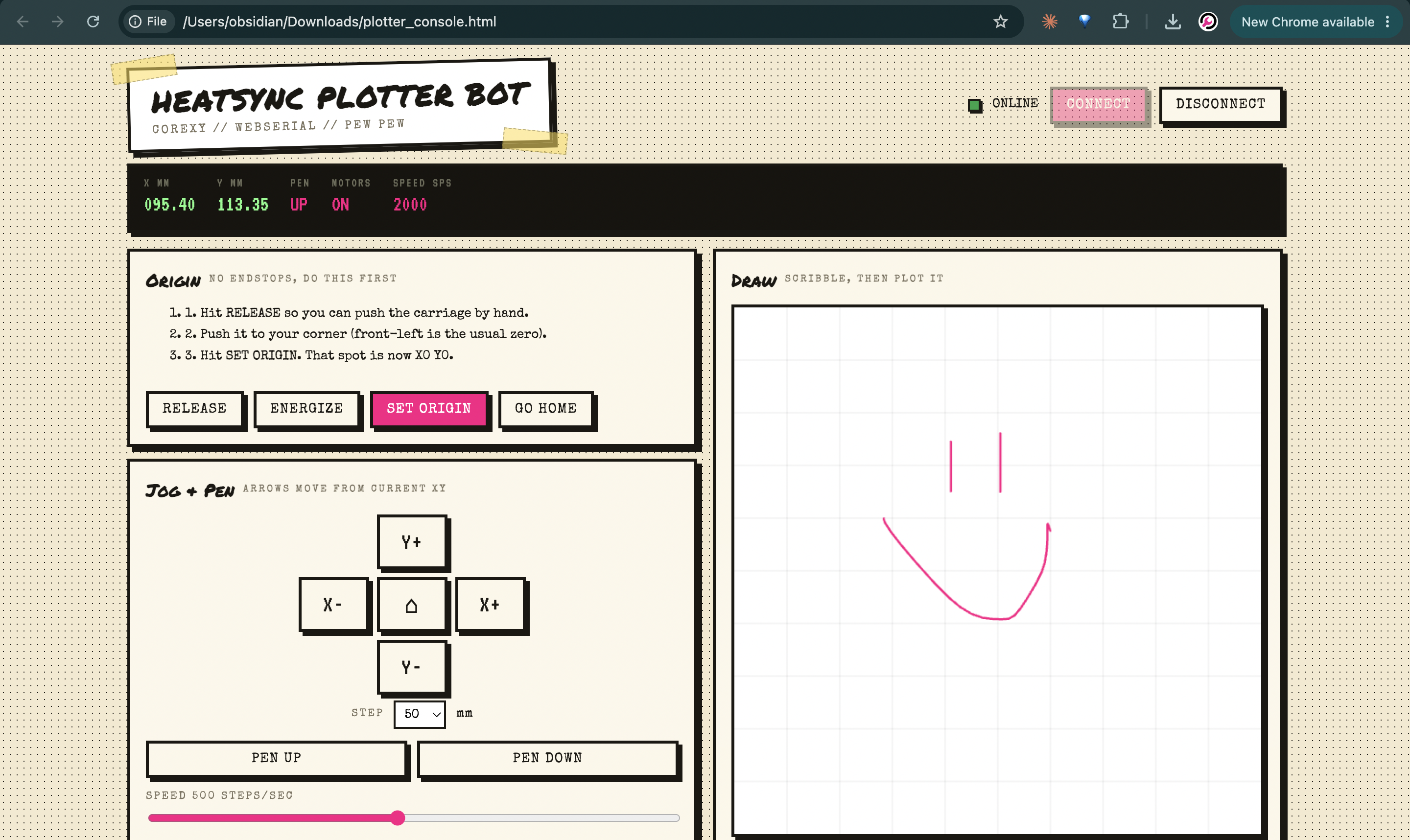
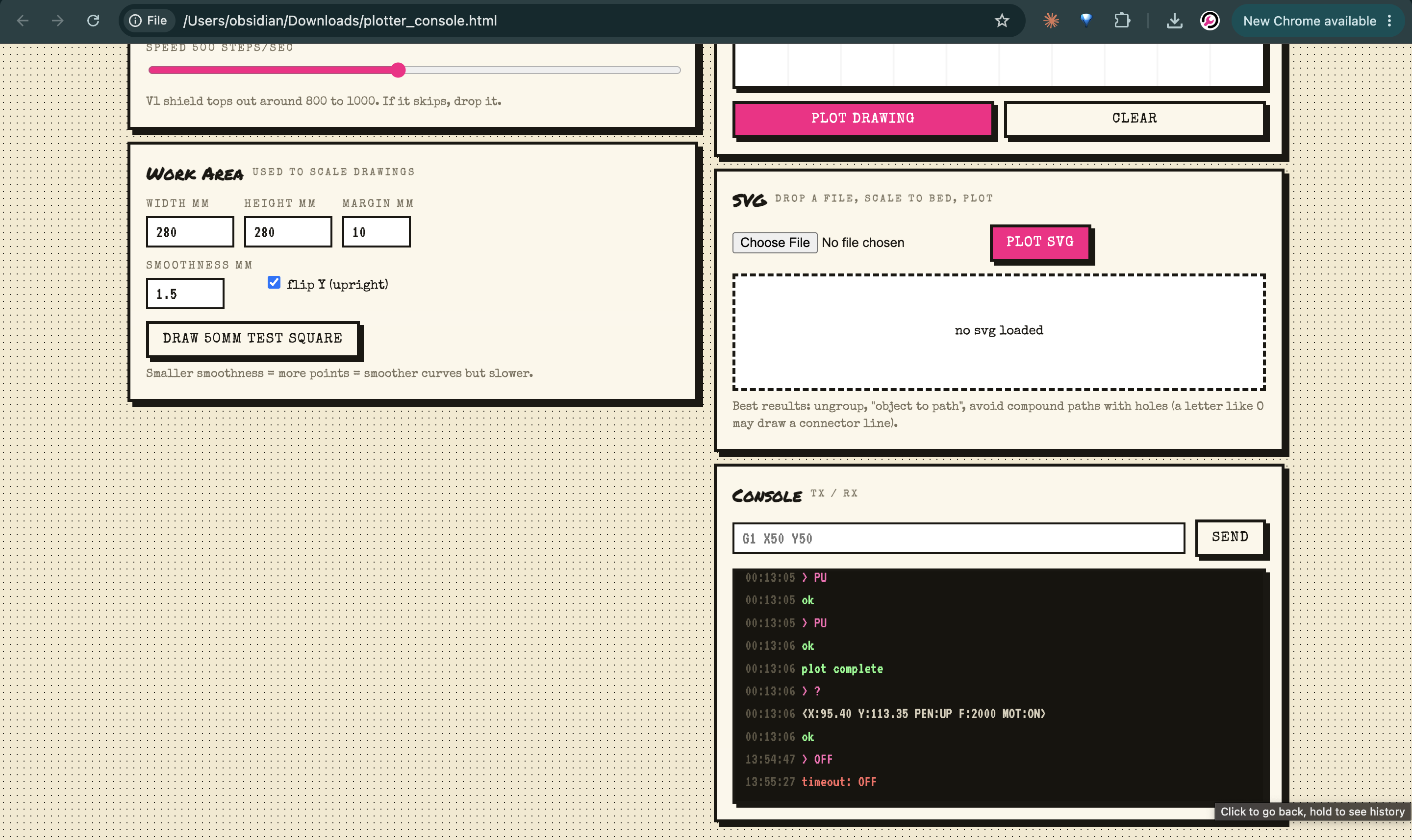
Then I opened the HTML single file app Claude made that uses webserial to talk to the Arduino in order to drive the steppers.
In the interface you first click connect, then press Release to move the carriage by hand to the bottom left corner, then click Set Origin, then click energize to power on the steppers again. Now the XY plotter is homed correctly.
From here you can use the visual interface to draw a bath and tell the plotter to take it, or upload an SVG and have it plot that. I'll be adding more to this especially once the wifi board is in, so we can send it text, images, etc and have it remotely plot.
Next is wiring up the ESP32 with the Stepper Drivers to the the plotter steppers as well as its servo for the pen carriage. I intend to have it connect remotely to a web interface for drawing using clasp.to and conduyt.io
I have a UV laser diode coming in the mail as well as some glow in the dark pigment. When you shine a uv laser directly at glow in the dark paint it shows like a bright line which slowly fades away. Perfect for a robotic etch a sketch people can control by scanning a QR code.
Anyone interested in hacking on this with me is welcome to do so adhoc, whether I'm there or not. You don't need to update me or coordinate if you don't want, I like the idea of people just hacking on this and it turning into a sort of monstrosity of creativity.
